
This vignette provides a short introduction to the ddfr
package. I apologize for it not being typeset beautifully, however as I
created this package for an exercise sheet submission at university, I’m
bound by time constraints.
Nevertheless, this vignette, together with the documentation usable
within R by ? should be more than enough in
order to get started with this package. Every function listed
below has a dedicated help page in R which should hopefully
provide you with all relevant information. You can also check out the Reference
on the website.
Lastly, thanks a lot for checking out my package! :)
Overview
After having installed the package (most probably from GitHub), it
can be loaded in R using the following command:
The focus of the package is working with the custom S4 class
ddf which provides a convenient way to work with discrete
distributions with finite support in R.
It has three slots called supp, probs and
desc which, in that order, give the support of the
distribution, the corresponding probabilities and a short description of
the respective distribution. They can all be accessed using the getters
supp(), probs() and desc(). For
the description there is also a setter such that it can easily be
changed:
mydist <- ddf(1:6, rep(1 / 6, 6), "A first description")
mydist
#> A first description
#>
#> Support:
#> [1] 1 2 3 4 5 6
#>
#> Probabilities:
#> [1] 0.1666667 0.1666667 0.1666667 0.1666667 0.1666667 0.1666667
supp(mydist)
#> [1] 1 2 3 4 5 6
desc(mydist) <- "This description fits better"
mydist
#> This description fits better
#>
#> Support:
#> [1] 1 2 3 4 5 6
#>
#> Probabilities:
#> [1] 0.1666667 0.1666667 0.1666667 0.1666667 0.1666667 0.1666667
Creating new ddf objects
Manually
The intended way to create custom new ddf objects is to
use the provided function with the same name. It takes as its arguments
a numerical vector specifying the support of the distribution, a second
numerical vector of the same length containing the corresponding
probabilities and lastly, an optional description of the
distribution.
For example, to create a distribution modeling a single throw of a fair six-sided dice, one can use:
ddf(1:6, rep(1 / 6, 6), "A distribution modeling a single dice throw")
#> A distribution modeling a single dice throw
#>
#> Support:
#> [1] 1 2 3 4 5 6
#>
#> Probabilities:
#> [1] 0.1666667 0.1666667 0.1666667 0.1666667 0.1666667 0.1666667
Note that the probabilities have to approximately sum up to \(1\) or otherwise the function throws an
error. While this might change in the future, in the current
implementation, the error has to be less than 1e-10:
# Probabilities don't sum up to ≈1
try(ddf(1, 1 - 1e-10))
#> Error in validObject(.Object) :
#>   invalid class "ddf" object: probabilities have to sum up to approximately 1

# This works
ddf(1, 1 - 1e-11)
#> A discrete distribution with finite support
#>
#> Support:
#> [1] 1
#>
#> Probabilities:
#> [1] 1
In case one does not have probabilities, but absolute frequencies
instead, one can also use ddf_from_frequencies() as an
alternative. For example, the following creates a ddf
object from hypothetical counts of throwing a six-sided dice one hundred
times:
ddf_from_frequencies(1:6, c(19, 14, 17, 18, 15, 17), "My dice throws")
#> My dice throws
#>
#> Support:
#> [1] 1 2 3 4 5 6
#>
#> Probabilities:
#> [1] 0.19 0.14 0.17 0.18 0.15 0.17
As one can see, the arguments are mostly the same except for passing the frequencies instead of the probabilities as the second argument.
For more details on both methods please consult the documentation of
ddf() and ddf_from_frequencies(),
respectively.
Using the already implemented distributions
ddfr already provides you with a large amount of common
discrete distributions. The below list shows the currently implemented
discrete distributions with finite support. To learn more about any
single one of them, use the help in R,
e.g. ?bin(). Once again I’d like to mention the Reference
as it might also be a convenient way to find a specific distribution
you’re looking for.
- Discrete uniform distribution as
unif() - Bernoulli distribution as
bernoulli() - Binomial distribution as
bin() - Rademacher distribution as
rademacher() - Benford’s law as
benford() - Zipf distribution as
zipf() - Hypergeometric distribution as
hypergeometric() - Negative hypergeometric distribution as
negative_hypergeometric() - Beta-binomial distribution as
beta_binomial()
Furthermore, there are also functions to create approximations of the following three discrete distributions with countably infinite support.
- Poisson distribution as
pois() - Negative binomial distribution as
negative_bin() - Geometric distribution as
geometric()
The approximation works by finding a large enough number \(r > 0\) such that cutting of the support
after \(r\) yields an overall
probability which is within a given range \(\epsilon\) of \(1\). The default value for \(\epsilon\) is 1e-10, however
this can be customized using the eps argument. Unless the
normalize argument is manually set to FALSE
(by default it is TRUE) the approximation is then also
normalized such that the sum of all probabilities becomes precisely one.
The following examples demonstrate this, however, for further details
you might also want to check out the respective documentation of the
function you’re using.
# Approximation of the Poisson distribution
# to demonstrate the `normalize` argument
p <- pois(20, normalize = FALSE)

# Not equal to one (but still pretty close):
1 - sum(probs(p))
#> [1] 9.051593e-11

# Note how the `normalize` argument here could be omitted
# since it is `TRUE` by default
p_normalized <- pois(20, normalize = TRUE)

# Now the summed probabilities are equal to one:
1 - sum(probs(p_normalized))
#> [1] 0


# For most cases, something like this should suffice
geometric(0.8)
#> (Approximation of a) geometric distribution with p = 0.8, starting at 0
#>
#> Support:
#>  [1]  0  1  2  3  4  5  6  7  8  9 10 11 12 13 14
#>
#> Probabilities:
#>  [1] 8.00000e-01 1.60000e-01 3.20000e-02 6.40000e-03 1.28000e-03 2.56000e-04
#>  [7] 5.12000e-05 1.02400e-05 2.04800e-06 4.09600e-07 8.19200e-08 1.63840e-08
#> [13] 3.27680e-09 6.55360e-10 1.31072e-10

# However, you can of course increase the accuracy if you want to
geometric(0.8, eps = .Machine$double.eps)
#> (Approximation of a) geometric distribution with p = 0.8, starting at 0
#>
#> Support:
#>  [1]  0  1  2  3  4  5  6  7  8  9 10 11 12 13 14 15 16 17 18 19 20 21
#>
#> Probabilities:
#>  [1] 8.000000e-01 1.600000e-01 3.200000e-02 6.400000e-03 1.280000e-03
#>  [6] 2.560000e-04 5.120000e-05 1.024000e-05 2.048000e-06 4.096000e-07
#> [11] 8.192000e-08 1.638400e-08 3.276800e-09 6.553600e-10 1.310720e-10
#> [16] 2.621440e-11 5.242880e-12 1.048576e-12 2.097152e-13 4.194304e-14
#> [21] 8.388608e-15 1.677722e-15
From other ddf objects
Lastly, there is also the possibility to use already existing
ddf objects to create new ones. Currently there are only
two functions for doing so.
The first one is the generic method - with which the
support of a distribution can be multiplied with \(-1\):
-bin(5, 0.8)
#> Binomial distribution with parameters n = 5 and p = 0.8, multiplied with -1
#>
#> Support:
#> [1] -5 -4 -3 -2 -1  0
#>
#> Probabilities:
#> [1] 0.32768 0.40960 0.20480 0.05120 0.00640 0.00032
The second one is the function shift() with which the
support of a distribution can be shifted by a specified amount:
Analysis of distributions
ddfr provides many ways to analyze a given distribution.
This section only lists the corresponding functions. For details, the
respective documentations should hopefully suffice.
Central tendency
- Expected value as
expected_value()or genericmean() - Medians as
medians()(plural form as they aren’t necessarily unique) - Modes as
modes()(plural form as they aren’t necessarily unique)
Dispersion
- Standard deviation as
standard_deviation() - Variance as
variance() - Interquartile range as
iqr() - Range as
distribution_range()
Moments
-
\(n\)-th raw moment as
moment() -
\(n\)-th central moment as
central_moment() -
\(n\)-th standardized moment as
standardized_moment()
Besides this, there are also additional functions for calculating some specific often used moments (besides the already previously mentioned variance):
- Skewness as
skew() - Kurtosis as
kurtosis() - Excess kurtosis as
excess_kurtosis()
Quantiles
- Quantiles as
quantiles() - Percentiles as
percentile() - Deciles as
decile() - Quartiles as
quartile()
Entropy
- Entropy as
entropy()
Report
In case one wants to quickly get an overview of the considered
distribution, there is also the function report() which, as
the name suggests, writes a report on the given distribution involving
most of the above properties. The following example demonstrates this
(please not that for the purpose of better readability, the output is
printed as normal text):
The given distribution could be described as “Binomial distribution with parameters n = 15 and p = 0.7”.
It has a mean/expected value of 10.5, the average of its mode(s) is given by 11 and the average of its median(s) is 11. It is a unimodal distribution.
Regarding its dispersion, calculating its variance yields 3.15 which implies a standard deviation of 1.77482393492988. When talking about other measures of variability, one can assert that the distribution’s range constitutes 15 over its 16 elements, whereas its interquartile range is given by 3 since the (smallest) first quartile is 9 and the (largest) third quartile is 12.
It has a skewness of -0.225374467927603 (measured using Fisher’s moment coefficient of skewness) and with an excess kurtosis of -0.0825396825396827 (and hence kurtosis of 2.91746031746032) it is a platykurtic, also called platykurtotic, distribution.
Lastly, it can be noted that its entropy, measured in bits, is 2.86637454085645.
Creating new objects from ddf distributions
Creating R functions
One can use pmf and cdf to get
R functions behaving like the probability mass function and
cumulative distribution function for a given distribution, respectively.
Especially the first of these two is rather useful as it can be used to
get the probability of any number:
# Probability of 5 in a binomial distribution with parameters n = 10 and p = 0.7
pmf(bin(10, 0.7))(5)
#> [1] 0.1029193
Note that this also works for numbers which are not part of a distribution’s support, in which case the function simply returns \(0\):
Sampling
Use samples() to create samples based on a distribution.
For example, one can simulate 10 fair dice throws as follows:
This function was also used to generate the frequency table for dice
throws above in the “Creating new ddf objects” section.
Plotting
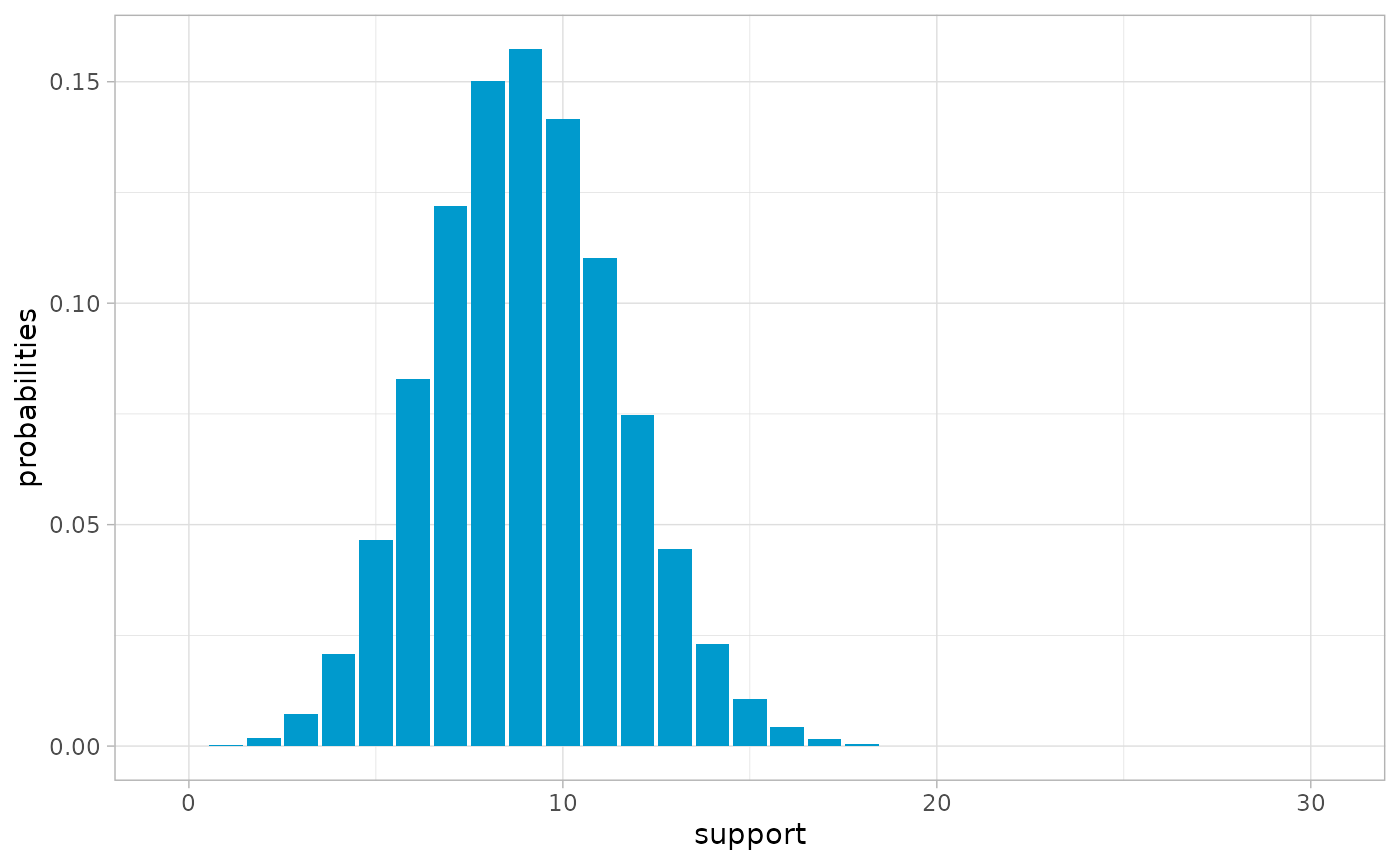
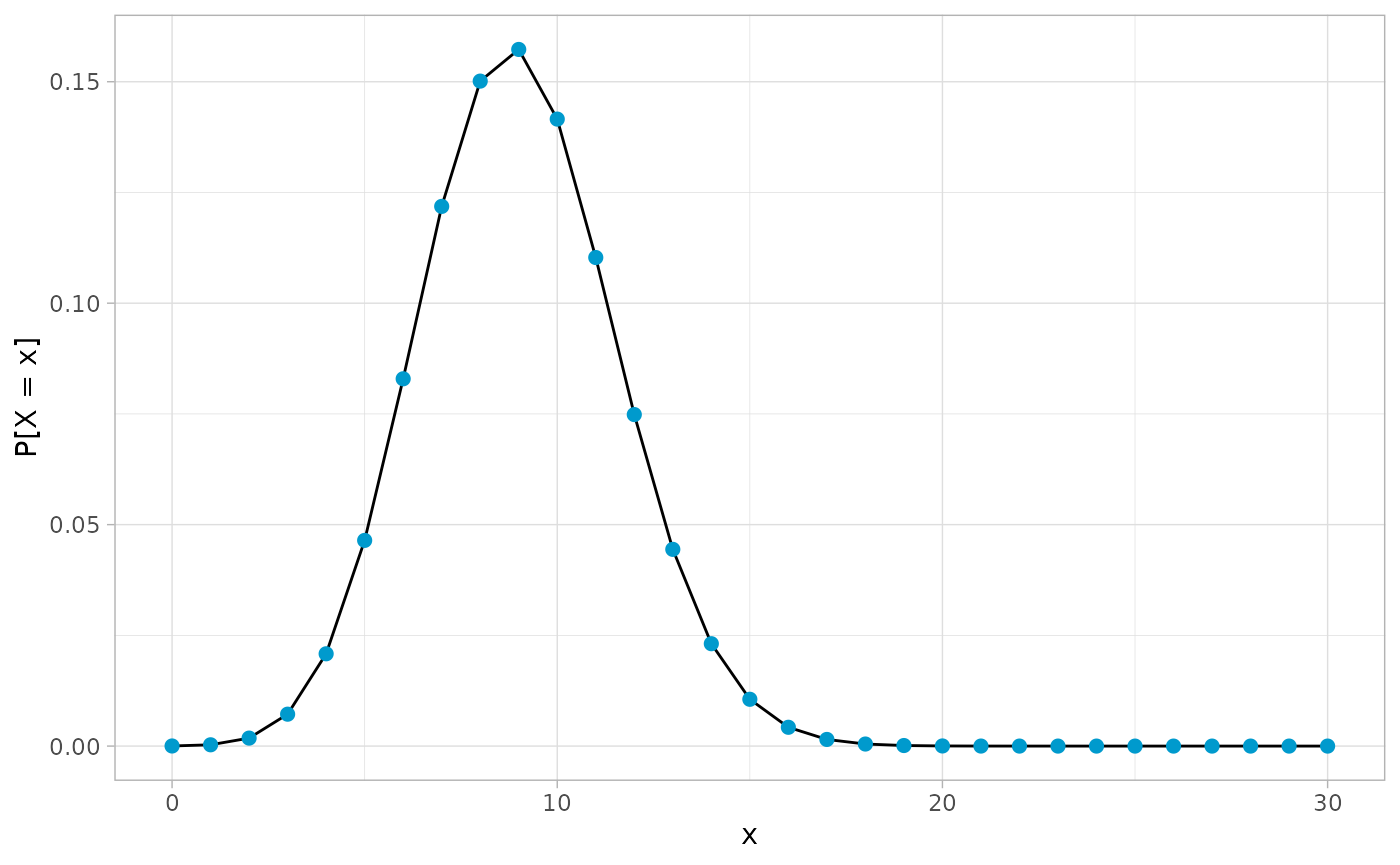
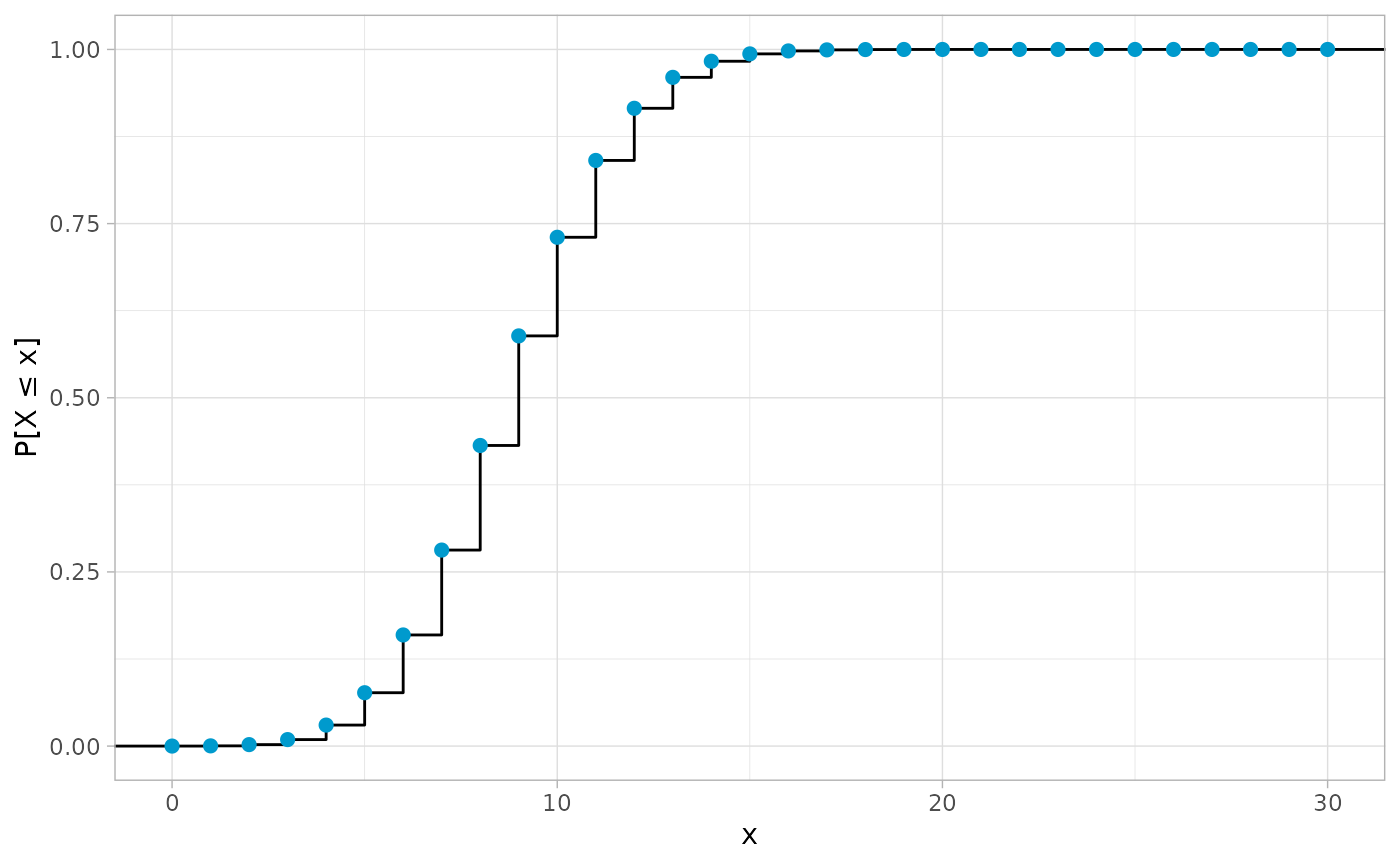
ddfr also provides extensive plotting capabilities via
the three functions plot(), plot_pmf() and
plot_cdf(). The first one of these is once again a generic
for the S4 class ddf.
At least when it comes to plots, an image is worth a thousand words, so here are all three functions in action:
Convolutions
Lastly, there is the possibility to calculate convolutions of distributions. For example, to compute the distribution of the sum of two six-sided dice when tossed together, one can use
conv(unif(6), unif(6))
#> A convolution
#>
#> Support:
#>  [1]  2  3  4  5  6  7  8  9 10 11 12
#>
#> Probabilities:
#>  [1] 0.02777778 0.05555556 0.08333333 0.11111111 0.13888889 0.16666667
#>  [7] 0.13888889 0.11111111 0.08333333 0.05555556 0.02777778

# Short hand using *
unif(6) * unif(6)
#> A convolution
#>
#> Support:
#>  [1]  2  3  4  5  6  7  8  9 10 11 12
#>
#> Probabilities:
#>  [1] 0.02777778 0.05555556 0.08333333 0.11111111 0.13888889 0.16666667
#>  [7] 0.13888889 0.11111111 0.08333333 0.05555556 0.02777778
The second example shows how the generic * has also been
defined for objects from the ddf class to quickly convolve
distributions.
The function conv_n() calculates the \(n\)-fold convolution of a distribution with
itself, see ?conv_n() for details.
Lastly, there is also the function convolve_cpp() which
is the underlying implementation for the convolution using
Rcpp for better performance. It is not really intended for
use with ddfr objects directly, but might still be useful
in other applications.